

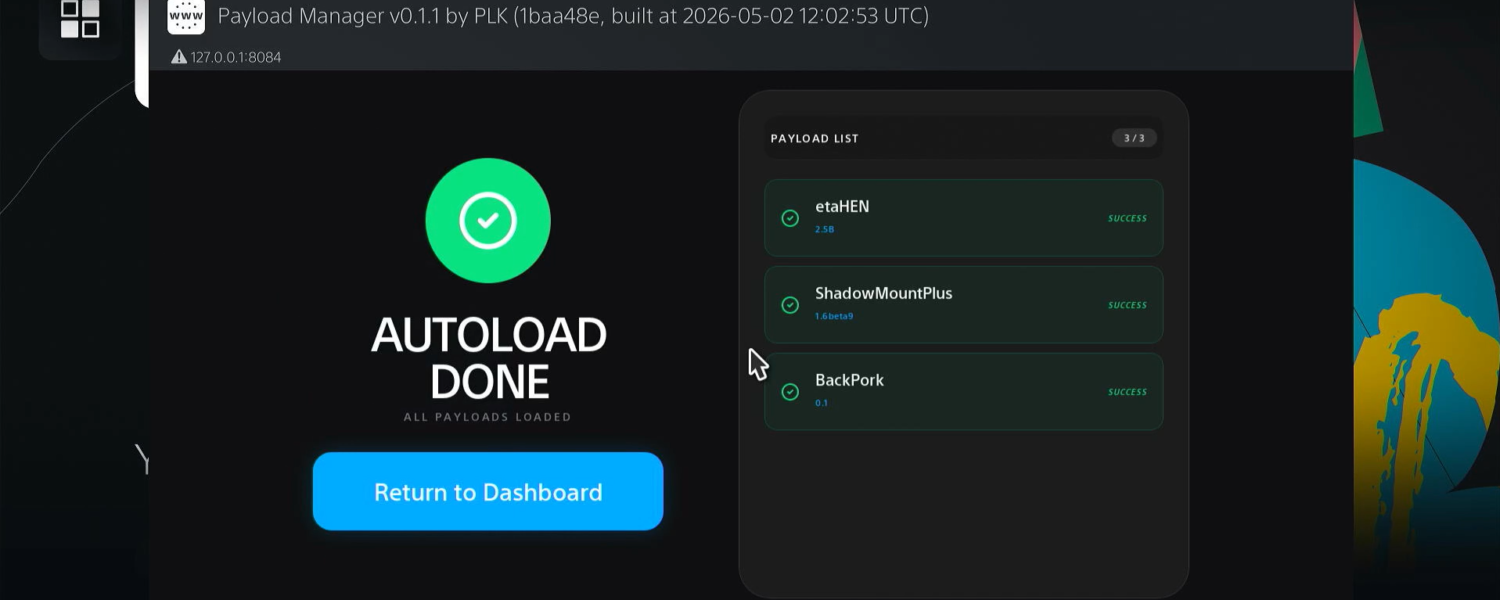
Published a new update for PS5 Y2JB Autoloader, the tool designed to automate the sequential loading of payloads on PlayStation 5 consoles without requiring manual intervention between steps.
With version 0.5, the project continues to evolve in a concrete way, improving both the user experience and the overall reliability for those who use the jailbreak through the modified YouTube app.
Based on the fork of Gezine’s original Y2JB project and maintained by itsPLK, this tool allows you to automatically perform all the fundamental operations at startup: from the kernel exploit to the upload of the elf loader, until the start in sequence of custom payloads as files .elf, .binand script .js.
All this takes place without the need for manual intervention, making the process much faster and above all repeatable without errors.
Among the most evident innovations stands out the new graphical interface, much cleaner and more organized, which replaces invasive notifications with a dedicated window, improving readability and control of operations.
The introduction of the Payload Manager is also an important step in terms of stability, as it allows you to better manage complex payloads such as etaHEN and kstuff, loading them more safely after the YouTube app is closed.
There is no shortage of security improvements: the default elf loader now accepts connections exclusively from the localhost, limiting possible unwanted external access.
At the same time, full compatibility with existing configurations is maintained, avoiding the user having to reconfigure everything from scratch after the update.
One of the strengths remains simplicity: just configure the file once autoload.txtto have a fully automated system at every start.
This makes Y2JB Autoloader an ideal solution for both advanced users and those who want a more immediate and uncomplicated approach. Support for a wide range of firmware, from version 4.03 to 10.01, further expands its use.
Guide: how to use ps5_autoloader
- Create a directory called
ps5_autoloader. - Within this directory, insert the files
.elf,.binand.jswhich you want to upload, in addition to a fileautoload.txt.- In the file
autoload.txtList the file names to upload, one per line. - File names are sensitive to uppercase/minuscle: make sure that each name matches exactly the file in the folder.
- To enter a pause between two payloads add a row with a token of the type
!1000, where the number is the delay in milliseconds (in the example 1000 ms). - Do not include in the file
autoload.txtthe kernel exploit (e.g.lapse.js) nor theelf_loader; these components are automatically loaded by the system.
- In the file
Placement of the folder
Place the folder ps5_autoloaderin one of the following routes (order of priority — the first takes precedence):
- Root of a USB stick.
- Internal Disc:
/data/ps5_autoloader - YouTube splash screen folder:
download0/cache/splash_screen/aHR0cHM6Ly93d3cueW91dHViZS5jb20vdHY=/ps5_autoloader
Example of file content autoload.txt:
payload1.elf
!500
script.js
helper.bin
n this example payload1.elfis sent, waits half a second and then they are sent script.jsand helper.bin.
How to update
From version 0.2, you can update the autoloader by simply copying the archive y2jb_update.zipinside a USB stick and starting the app.
Configuration instructions
- The installation is identical to the original Y2JB (remote loader) exploit.
PS5 with jailbreak (WebKit, Lua, BD-JB)
- Install the correct version of YouTube (v1.03).
- Use an FTP client to copy the file
download0.datin:/user/download/PPSA0165*
PS5 without jailbreak
You could find a system backup with Autoloader already configured (not distributed by the author). Alternatively, you can restore a Y2JB (remote loader) system backup and then:
- Install the Autoloader above it using y2jb_updater.
- Alternatively, use an FTP client to copy
download0.datin/user/download/PPSA01650, or install a separate YouTube app from another region and use FTP to copydownload0.datin/user/download/PPSA0165*
Additional information
To use different autoload configurations with multiple YouTube applications from different regions, you need to rename the directory to ps5_autoloader_[TITLE_ID], for example ps5_autoloader_PPSA01650.
This way you can have files autoload.txtseparated for each app. These directories always take precedence over the generic folder ps5_autoloader.
To use a custom version of ELF Loader, simply copy the file elfldr.elf(the name must be exactly this) within the autoload directory and add the entry elfldr.elfin the file autoload.txt, before any other ELF.
As for the stability issues in loading etaHEN, it can happen that the payload is not loaded properly. The problem seems to be related to etaHEN/kstuff and manifests itself especially on the latest firmware.
To improve stability, you can turn off the automatic injection of the etaHEN toolbox or load etaHEN without kstuff and load kstuff separately.
Another solution is to minimize the YouTube app, holding down the button  , before etaHEN is loaded immediately after the execution of lapse. You can also enter a delay before loading etaHEN to have more time to minimize the application.
In case multiple ELFs are loaded, it is recommended that etaHEN/kstuff is the last payload of the sequence.
Some users report that adding a slight delay before loading etaHEN improves stability, although it is likely to be simply a placebo effect.
Changelog
- New Loader interface: A clean graphical interface that replaces system notification spam with a log-dedicated window for important status updates. In case of an error, the interface automatically hides to show the complete debugging logs in the “old” style.
- Payload Manager (New Default ELF): Manages payload loading after closing the YouTube app, improving payload stability like etaHEN and kstuff.
- Compatibility note: Existing autoload configurations will continue to work as previously.
- Usage Note: If you choose to use the Payload Manager, it must be the only item in the file
autoload.txt.
- Custom ELF Loader: The
elfldrdefault now accepts connections only from the PS5 itself (localhost). This improves security by preventing other devices on the network from sending payloads to the console.- Note: You can still use a standard elfldr if you need to send payloads from other devices. See the “Additional Info” section in the README.md file for instructions.
Download: PS5 Y2JB Autoloader v0.5
Download: Youtube App
Download: PLK 0.4 – skin
Download: FileZilla
Original article in Italian: biteyourconsole.net
Comments