

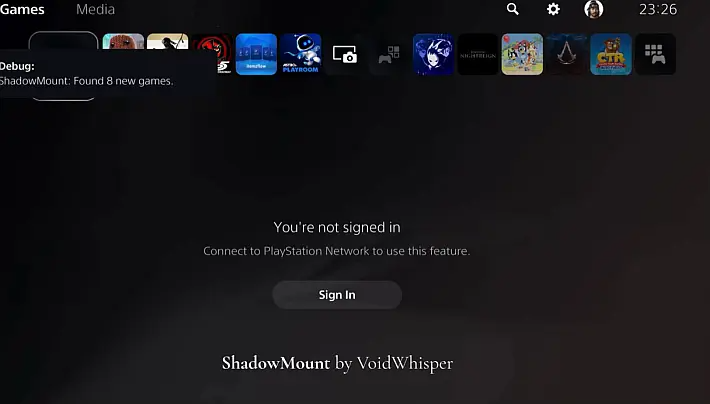
The developer VoidWhisper has created one of the most interesting and promising payloads of the homebrew PS5 scene at the beginning of 2026, although still in beta, ShadowMount was born with the aim of completely eliminating the complexity and manual operations related to the mounting of game backups.
In a period of strong turmoil for the community, also fueled by the recent leak of ROM keys that gives a glimpse of significant developments during the year, ShadowMount is part of an already mature tool, ready to take full advantage of the future progress of the jailbreak.
The operation of ShadowMount is designed to be invisible to the user. Once loaded, the payload works entirely in the background and automatically scans all the default folders of internal storage, connected USB devices and external hard drives.
It recognizes PS5 game dumps, mounts them, installs the necessary assets, and makes them immediately available in the console dashboard, without requiring manual menus, configurations, or interactions.
The mounted games remain available even after a restart or exit from the rest mode, offering an extremely smooth experience and consistent with the “official” use of the console.
One of the most appreciated aspects is total automation. ShadowMount is really plug & play: just start the PS5 or connect a USB device and the tool does everything on its own.
The program is able to process large libraries in seconds, properly manages the hot-swap of USB devices avoiding crashes and slowdowns, and uses a smart detection system that ignores the games already mounted, reducing startup times.
System notifications provide discreet feedback on the progress of operations, with the ability to activate richer graphics popups via notify.elf. For very large dumps, there are additional integrity checks, designed to increase overall reliability.
From a compatibility perspective, ShadowMount requires Kstuff v1.6.7 and works on all firmware currently supported by the PS5 jailbreak scene, including environments like etaHENetaHEN.
Tools like Itemzflow are not necessary, because ShadowMount operates completely independently. The installation can be done via PLK autoloader, simply by inserting the necessary rows in the autoload file, or manually by sending the payloads on the 9021 port with a payload sender.
At the first execution, especially in the presence of a very large library, the initial scan may take a few moments, but the process remains fully automatic.
Main features
- Zero-Touch automation: No menu, no click. ShadowMount scans storage and installs games automatically.
- No additional apps required: Completely replaces Itemzflow, webMAN, DumpRunner, DumpInstaller, WebSrv, and the Homebrew Store for mounting operations.
- Automatic asset management: Assets are managed automatically, eliminating the need to copy files via other tools.
- Hot-Swap Support: Manages removal and re-entering drives without problem removal and re-entry, without causing system instability.
- Batch processing: Capable of scanning and mounting dozens of games simultaneously in seconds.
- Smart detection: Recognizes the games already mounted at startup and skips them, ensuring an overhead start.
- Visual Feedback:
- System notifications: Non-invasive status updates for new installations.
- Advanced graphic toast (optional): Graphic popups that confirm the installation of the game.
- Note: This function requires
notify.elfand is separated for users who prefer a cleaner experience without popups.
- Note: This function requires
Supported paths
ShadowMount performs a recursive scan of internal storage and all USB ports for the following directory structures:
/data/homebrew/data/etaHEN/games/mnt/usb0/homebrewuntil/mnt/usb7/homebrew/mnt/usb0/etaHEN/gamesuntil/mnt/usb7/etaHEN/games/mnt/ext0/homebrewand/mnt/ext0/etaHEN/games
Installation and use
Requirements:
- PS5 jailbroken console
- Kstuff v1.6.7
Note: etaHEN and Itemzflow are optional. ShadowMount works independently.
Method 1: Manual payload injection (Port 9021)
Use a payload sender (like NetCat GUI or a web loader) to send files to port 9021.
- Send
notify.elf(optional), only if you want graphic popups. - Send
shadowmount.elf. - Wait for notification: “ShadowMount v1.2 Beta by VoidWhisper Loaded.”
Method 2: Autoloader PLK (recommended)
Add ShadowMount to the file autoload.txtof plk-autoloader to start it automatically at each boot.
!1000
kstuff.elf
!1000
notify.elf  ; Opzionale - rimuovi questa riga se non vuoi i toast grafici
!1000
shadowmount.elf
Notes
- First start: If you have a very large library, the initial scan may take a few seconds to record all the titles.
- Large games: For very heavy titles (over 100 GB), wait a few second extras for the system to verify the integrity of the files before the installation notification.
Download: ShadowMount
Original article in Italian: biteyourconsole.net
Comments